Skip to main article
Wicked Island crest Wicked Island 1.0 Survival RPG Encyclopedia & Progression Database
Steam Store

Wicked Island Cheats, Console Commands & Dev Menu Guide (Numpad /)

Wicked Island has no typed console commands or promo codes. Instead, press Numpad / on a full keyboard to open the built-in Dev Cheat Menu. On TKL keyboards or Steam Deck, open ESC -> Input Settings -> Interface and rebind Cheat Menu (Numpad /), Hide UI (Numpad 0), and Unstuck (Numpad -) to unused keys.

Dev Cheat Menu
Default Shortcut Numpad / (Forward Slash)
Console Commands None (Graphical Cheat Menu)
Promo / Redeem Codes None in Wicked Island
TKL Required Rebinds Numpad /, Numpad 0, Numpad -
1.0 Patch Fix Cheat-spawned Dragons now work

1. Dev Cheat Menu vs. Console Commands & Promo Codes

Players searching for Wicked Island console commands, command codes, or cheat codes often expect a text-entry tilde console or Roblox-style promo codes. Wicked Island has neither redeemable promo codes nor a typed text command prompt. Instead, RawDarkness built a graphical Cheat Menu directly into the PC client, bound by default to Numpad / (specifically the forward-slash key on a full numeric keypad, not the standard / key next to Right Shift).

Opening the Cheat Menu grants instant sandbox toggles and spawn controls for testing armor tiers, spawning weapons that were removed from survival drops, or summoning creatures and mounts. Because the menu is graphical, every option is triggered by clicking entries rather than typing item IDs.
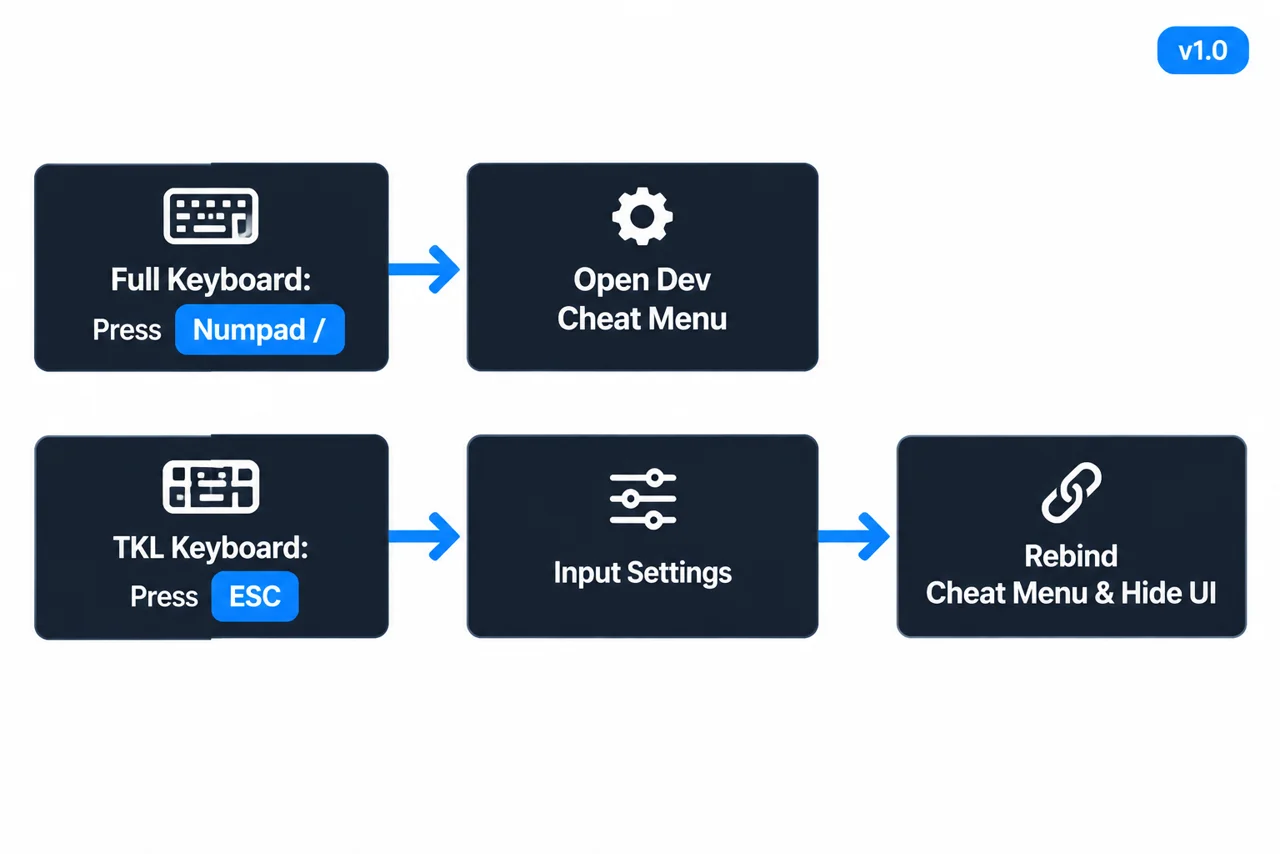
Wicked Island 1.0 Dev Menu and TKL keybind rebinding flow: press Numpad / or open ESC -> Input Settings -> rebind Cheat Menu, Hide UI (Numpad 0), and Unstuck (Numpad -).
Default Numpad / Dev Menu shortcut and TKL rebinding flow

2. How to Open & Rebind on TKL Keyboards (Step-by-Step)

Because the default bindings assume a full 104-key keyboard with a numeric keypad, players on 60%, 75%, or tenkeyless (TKL) keyboards—as well as laptops and Steam Deck users—must remap three Numpad bindings inside Input Settings before they work.

Track your setup steps locally:
  1. Press ESC (or Home) to open the Pause Menu, or configure from the Main Menu before loading a save.
  2. Select Input Settings and open the Interface category.
  3. Locate Cheat Menu (default Numpad /) and rebind it to an unused key such as F8 or \.
  4. While in Interface, also rebind Hide UI (default Numpad 0) so you never confuse it with TAB (Toggle HUD).
  5. Open the Actions category and rebind Unstuck (default Numpad -) and Cum Visual Effect (default Numpad 8) if needed.
  6. Click Apply, return to gameplay, and press your newly bound Cheat Menu key to verify the overlay opens.

3. All Numpad & Utility Keybinds Reference

Keep these default utility bindings handy when troubleshooting missing menus or stuck terrain geometry.

Menu Category Action Name Default Key Recommended TKL Rebind
Interface Cheat Menu Numpad / F8 or Backslash (\)
Interface Hide UI Numpad 0 F9
Actions Unstuck Numpad - F10
Actions Cum Visual Effect Numpad 8 F11 (optional)
Actions Quick Save F5 Keep default F5

4. Spawnable Items, Dragons & v1.0 Cheat Menu Fixes

Across Early Access hotfixes and the November 17, 2026 Version 1.0 launch, several Cheat Menu bugs were specifically patched so testing runs match normal gameplay:

  • Removed Sandbox Weapons: Novelty test weapon "Big F***ing Sword" (9,000 durability, 100% crit chance) was removed from survival loot tables in earlier builds and remains exclusively accessible via the Cheat Menu.
  • Dragons Spawned from Cheat Menu (Fixed in v1.0): Prior to Version 1.0, dragons spawned through the Cheat Menu failed to initialize properly as usable mounts/servants. The 1.0 patch notes explicitly fix Cheat Menu-spawned dragons so they function normally.
  • Servant Trait & Level Bugs (Patched): Hotfix 4 resolved bugs where servants spawned from the Cheat Menu leveled up abnormally fast or spawned without creature traits.
  • Map + Hidden UI Soft-Lock (Fixed in v1.0): Toggling the World Map (M) while the GUI was hidden previously soft-locked the client; Version 1.0 fixed that interaction.
  • Save Safety & Steam Deck Tip: Press F5 (Quick Save) or create a separate save slot via ESC → Save before spawning test gear or creatures so your primary survival progression stays separate. On Steam Deck, rebind Cheat Menu to an unused key such as F8 in Input Settings and map a back grip or radial menu button to F8 in Steam Input (Steam Deck & Controller Setup).

Next, browse legitimate survival gear upgrades in our Rune Blade & Mystery Keys Guide or check full keyboard & handheld layouts in Steam Deck & Controls Setup.

Sources

Default Numpad bindings, Cheat Menu behavior, removed test weapons, Hotfix 4 servant trait fixes, and Version 1.0 Cheat Menu dragon fixes come from official Steam patch notes and Wicked Island community wiki documentation.

Advertisement

Frequently Asked Questions

Are there console commands or redeem codes in Wicked Island?

No. Wicked Island uses a built-in graphical Dev Cheat Menu opened with Numpad / rather than typed console strings or redeemable promo codes.

How do I open the Wicked Island Cheat Menu without a Numpad?

Press ESC to open Input Settings, scroll to Interface -> Cheat Menu, and rebind it from Numpad / to an available key such as F8 or Backslash.

Do Cheat Menu dragons work in Wicked Island 1.0?

Yes. The November 17, 2026 Version 1.0 patch specifically fixed dragons spawned via the Cheat Menu so they work properly.

Wicked Island 1.0 Encyclopedia Index
Core Sections Main Page · Guides Hub · Beginner Guide & Controls · Weapons, Mystery Keys & Armor · Dragon, Taming & Dungeons · Updates Changelog · 1.0 PC Specs & Save Rules
Standalone Guides Rune Blade & Mystery Keys · Queen's & Consort's Armor · NPC Quests (Aeron & Isabell) · Dragon Mount & Servant Taming · Unbound 3x EXP & Lv 30+ Scaling · Island Map & Ore Caves · Cheats & Dev Menu · Breeding & Defeat Settings · Farming & Base Sites · Steam Deck & Controls · Achievements & Workshop · Demo vs. 1.0 Release · Crafting & Smelting · Merchants & Trading · 21 Creature Cards & Verses · Masks & Jewelry · Waystones Fast Travel
Sponsored

Did this guide help?

Player Notes & Discussion (0)

Advertisement